There is a reason people keep digging beige mice and heavy trackballs out of thrift-store bins. Modern pointing devices are precise and cheap, but they can feel disposable. A vintage mouse or trackball asks something different from you. It has weight. It has a cable. It has a ball you can remove with a twist of a ring. That physicality is not just nostalgia. It is a reminder that input devices are tools, and tools work best when you understand them.
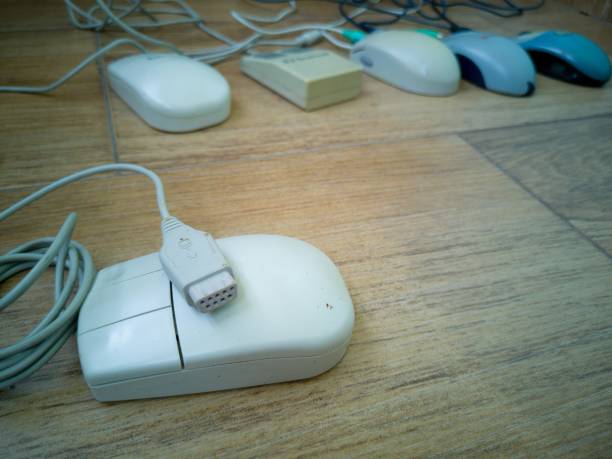
The classic ball mouse is the easiest place to start. Underneath that palm-filling shell sits a rubber-coated steel ball. As you slide the mouse, the ball rolls against two or three rollers inside. Those rollers turn slotted wheels, and optical sensors count the light pulses. The system is simple enough to explain at a kitchen table. The ball picks up dust, skin oil, and desk grit, then deposits it onto the rollers. Eventually the cursor stutters or refuses to move one direction. The fix is not a new mouse. It is a fingernail, a cotton swab, and a little isopropyl alcohol. You scrape the lint off the rollers, let everything dry, and drop the ball back in. That small repair teaches a big lesson: your devices are not magic. They are mechanisms.
Trackballs take the same idea and flip it. Instead of pushing a mouse around, you roll a ball with your thumb or fingers. The device stays put. That means less desk space, less arm travel, and less wrist strain for many people. Vintage trackballs from Logitech, Kensington, Microsoft, and other brands were built like tanks. Some had balls the size of a small plum. Others used a thumb ball on the side. They ruled drafting rooms and editing suites because they were precise and compact. Today they still show up in CAD work, music production, accessibility setups, and retro gaming. A good trackball can be faster than a mouse once your hand learns the motion. The ball has inertia. You are not flicking a plastic shell across a desk; you are operating a machine.
Nostalgia plays a role, of course. Beige plastic, coiled cords, and the soft rattle of a mouse ball are time machines. But the appeal is not only sentimental. Many vintage mice have shapes that modern companies abandoned. They fill the palm. They support the hand. They do not force a claw grip just to hit a tiny side button. Some old designs, like the Microsoft IntelliMouse and early Logitech MX mice, are still praised for their curves. Trackballs have an even stronger cult following because they solve a real problem. If your desk is small, your wrist hurts, or your cat keeps batting your mouse off the table, a stationary trackball is a practical answer.
Using vintage gear today takes a little patience. A PS/2 mouse can work through a USB adapter, though some adapters are fussy. Most basic mice and trackballs use standard human interface device protocols, so they often work without special drivers. Extra buttons may not. Old ball mice also have low resolution by today’s standards, so they are better for retro computers, office tasks, and casual play than competitive shooters. Clean the ball and rollers regularly. For trackballs, remove the ball and clean the bearings or rollers underneath. If the plastic has yellowed, you can retrobright it, but many people prefer the honest patina.
The real value of vintage mice and trackballs is that they invite you to tinker. You can open them, clean them, swap a cable, or replace a switch. You learn how a click becomes a command and how a rolling ball becomes a cursor. That knowledge makes you harder to sell a disposable upgrade. It also makes computing feel personal again. Start with a cheap thrift-store find. But you should try one. Borrow a trackball. Rescue a ball mouse from a junk box. Clean it, plug it in, and see what your hand remembers. It is worth the effort. The best peripheral is the one that disappears under your hand, and sometimes an old ball does that better than a new sensor ever will.