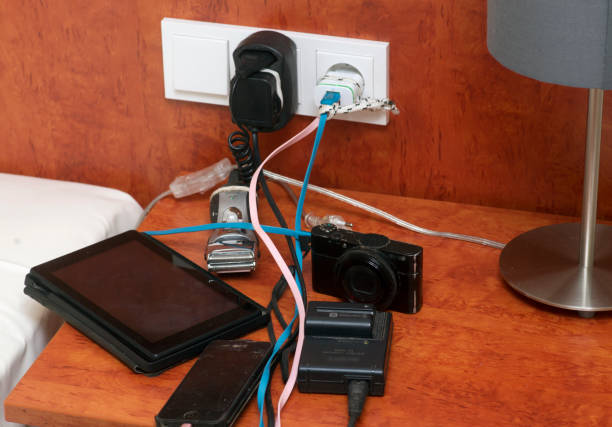
Your desk probably has more power running through it than you think. A laptop charger, two monitors, speakers, a phone charger, a lamp, a hub, maybe a mini fridge or a heated mug. None of that is scary by itself. The trouble starts when small devices multiply and the power strip becomes a game of Tetris. Safety is not about being afraid of electricity. It is about keeping heat, strain, and confusion away from the places your hands and feet go every day.
Start with the wall socket. It is the anchor of the whole setup. If it is loose, warm, cracked, or buzzing, stop using it and get help. That is not a “maybe later” problem. A power strip should plug directly into a wall outlet, not into another power strip. Daisy-chaining strips is tempting because you run out of spots, but it stacks up heat and load in a way the strips were never designed to handle. One strip per wall outlet is the simple rule. If you need more outlets, get a wider strip or a second strip on a different wall outlet, not a tower of adapters.
Surge protectors are not the same as power strips. A plain power strip gives you more outlets. A surge protector also has a component that sacrifices itself when a big voltage spike comes through. That matters for computers, monitors, and anything with expensive chips inside. But a surge protector is not a magic shield. It has a joule rating, and cheap ones may wear out after a few big hits. If your strip is years old, has no rating, or looks like a garage-sale mystery, replace it. For a desk with a computer and monitor, spend a little more on a reputable surge protector rather than the cheapest plastic brick.
Watch the load. Every device has a wattage, and every strip has a limit. You do not need to do electrical math for a phone charger, but you should think twice before plugging a space heater, hair dryer, or electric kettle into the same strip as your computer. Those high-draw appliances belong on their own wall outlet. The same goes for a mini fridge, which can cycle on and off and pull a surprising amount of current. If a strip feels warm, smells like hot plastic, or makes a crackling sound, unplug it and stop using it. Warm is not normal.
USB chargers deserve their own caution. A good USB-C charger can power a laptop; a bad one can run hot, whine, or fail early. Buy from a known brand, check that the charger supports the wattage your device expects, and skip no-name bricks that promise everything for almost nothing. More wattage is not automatically better. A charger that is too weak may run at its limit all day and get hot. A charger that is too strong for a device is usually fine if it follows USB standards, but the cheap exceptions are where trouble lives. Cables matter too. Frayed cables, bent connectors, and cables that get yanked daily are a safety issue. Replace them before they spark or stop charging reliably.
Placement is part of safety. Do not trap a power strip under a rug, behind a drawer, or in a pile of blankets. Heat needs to escape. Keep strips off the floor where drinks spill and pets chew. Mount them to the underside of the desk with the proper brackets if you want a clean look. Leave space around chargers, especially the chunky laptop bricks. If you have kids or curious pets, use outlet covers or a strip with shutters. A tidy desk is not just prettier. It is easier to see damage, dust, and heat before they become a problem.
Finally, make a reset habit. Once a season, unplug the strip, look for discoloration, check that plugs sit tight, and feel for warmth after normal use. Do not yank cords by the cable. Do not overload one strip because the spot is convenient. And do not ignore that little voice when something smells odd. Electricity is safe when it is respected, and your desk should be a place to work, play, and relax, not a quiet little hazard zone.