Eye strain is not a sign that your eyes are weak. It usually means your setup is asking your eyes to work too hard. Screens will not melt your retinas, but they can tire the muscles around your eyes and dry out your tear film. The fix is rarely one magic product. It is a handful of small changes that add up to a screen you can stare at for hours.
Start with brightness. The goal is not dim and not blinding. It is match. In a dark room, a bright white document is a flashlight. In a sunny room, a dim screen makes you lean in and squint. Open a blank white page and adjust brightness until it looks like a sheet of paper under the light in your room. Some monitors call this brightness; some call it luminance. On a laptop, the keyboard brightness keys are your friend. Do this at different times of day, because your screen should change with the room.
Lighting around the screen matters just as much. A single overhead light behind you can reflect off the screen and wash out detail. A window behind your monitor turns it into a mirror. A window in front of you can be worse, because you are staring into a bright background. Move your desk so the screen is perpendicular to the window if you can. Add a warm lamp to the side, or use bias lighting behind the monitor. Bias lighting is just a soft light stuck to the back of the screen. It reduces the contrast between the bright screen and the dark wall, which helps your pupils relax.
Glare is the enemy of comfortable reading. Matte screens are usually easier than glossy ones in a room with lamps or windows. If you already own a glossy laptop, try an anti-glare film or simply change where you sit. Sometimes turning the screen a few degrees or pulling a curtain solves more than a fancy filter. Keep the screen clean, too. Fingerprints and dust create a haze that forces your eyes to work harder. A microfiber cloth and a little water or screen-safe cleaner go a long way.
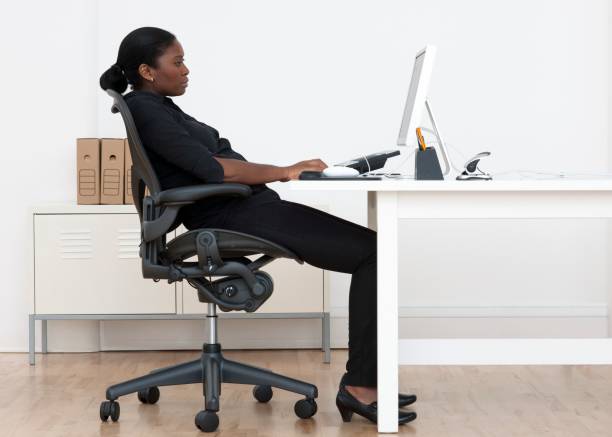
Put the screen about an arm’s length away. The top of the screen should be at or slightly below eye level. If it is too low, you open your eyes wider, blink less, and dry them out faster. Laptop users have it rough because the screen and keyboard are stuck together. If you can, raise the laptop on a stand and use an external keyboard and mouse. If you cannot, at least prop it up and lean back. Your neck and eyes share the same bad posture.
The classic rule is every twenty minutes, look at something twenty feet away for twenty seconds. It sounds fussy, but it works because it forces your focusing muscles to let go and reminds you to blink. Use a timer, an app, or a sticky note. Better yet, tie it to something you already do, like finishing a page or a level. You do not need to stare at a wall for a full minute. Just look out a window, across the room, or down a hallway.
Blinking is the part everyone forgets. When you stare at a screen, your blink rate drops, and your tears evaporate. If you wear contacts, it is worse. Keep preservative-free artificial tears nearby for dry days. A humidifier helps in winter or in air-conditioned offices. Do not point a fan or vent at your face. Try a few full, slow blinks when you notice that dry, gritty feeling. It is not glamorous, but it is effective.
Dark mode is not automatically better. In a bright room, a dark interface can make your pupils dilate and your eyes hunt for low-contrast text. In a dark room, a light interface can feel like a camera flash. Match the mode to the room. Blue light glasses are oversold for eye strain. Warm screen settings at night are mainly a sleep tool. Increase your text size and use browser zoom instead of squinting. If headaches, blurry vision, or pain persist, see an eye doctor. An eye-friendly battlestation is not about expensive gear. It is about light, distance, breaks, and moisture.