Most people set up a home workspace by finding a spare table, plugging in a laptop, and hoping for the best. That works for a week. Then the little aches start. Your neck feels stiff, your wrists tingle, your lower back complains, and your eyes feel like sandpaper. The problem usually isn’t that you’re fragile. It’s that your desk, chair, screen, and peripherals are fighting your body instead of supporting it.
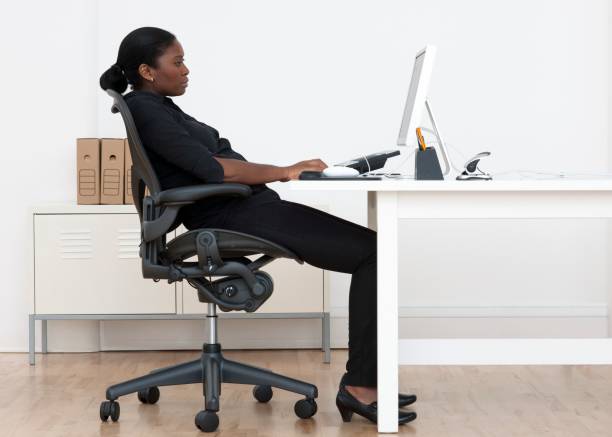
Start with the chair, because everything else depends on it. Your feet should rest flat on the floor or on a footrest. Your knees should be roughly level with your hips, maybe a touch lower. If your chair is too high, don’t dangle. Use a small footrest, a stack of books, or an old box. If your chair is too low, add a firm cushion. The goal is to take pressure off your thighs and lower back. Armrests should let your shoulders relax, not push them up toward your ears.
Next, deal with the desk height. When you sit tall and let your arms hang naturally, your elbows should land around ninety degrees, with your forearms roughly parallel to the floor. If your desk is too high, you’ll shrug and strain. If it’s too low, you’ll hunch. You can fix a too-high desk with a keyboard tray or an adjustable chair, but sometimes the simplest hack is to raise your chair and add a footrest. For a too-low desk, raise the whole desk with sturdy blocks or bed risers if it’s stable.
Then comes the screen. The top third of your monitor should be at or slightly below eye level when you sit comfortably. If you use a laptop, this is the biggest ergonomic trap. The screen is low, so you bend your neck, but the keyboard is attached, so you can’t raise it without reaching up. The fix is a laptop stand or a stack of books, plus a separate keyboard and mouse. That one change can save your neck and shoulders more than any fancy chair.
Keyboard and mouse placement matter more than most people think. Keep them close enough that your elbows stay near your sides. If you have to reach forward, you’ll round your shoulders. A keyboard with a slight negative tilt can help keep your wrists neutral. A mouse should sit beside the keyboard, not on a far corner. If your wrist bends up, down, or sideways all day, you’re asking for trouble. A wrist rest can help, but it should support the heel of your hand during pauses, not become a permanent crutch while typing.
Lighting is part of comfort too. Harsh overhead light and a glossy screen create glare that makes your eyes work harder. Put your monitor perpendicular to windows when possible. Use a desk lamp with a warm bulb for paperwork, and adjust screen brightness to match the room. If your eyes feel tired by afternoon, try the 20-20-20 rule: every twenty minutes, look at something twenty feet away for twenty seconds. It sounds silly, but it gives your eye muscles a break.
Temperature and air matter as well. A cold room makes your muscles tense. A hot room makes you sluggish. Keep a small fan or a throw blanket nearby. If dry air irritates your eyes, a humidifier can help. Noise matters too; gentle headphones or earplugs can lower stress.
Movement is the secret ingredient. No perfect posture is perfect forever. Your body wants to shift, stretch, and reset. Stand up every thirty to sixty minutes. Roll your shoulders, tilt your head side to side, and open your hands wide. If you can, take a short walk. A standing desk can help, but only if you actually change positions. Standing all day is not better than sitting all day. Alternating is better.
Finally, personalize the space. Comfort is not about copying someone else’s setup. It’s about finding what lets you work without pain. Maybe that means a split keyboard, a trackball, a softer chair cushion, or a monitor arm. Start with the free fixes first: raise the laptop, lower the chair, support your feet, and move more. Then upgrade only what still bothers you. A comfortable home setup doesn’t have to be expensive. It just has to fit you.